
[fusion_builder_container hundred_percent=”no” hundred_percent_height=”no” hundred_percent_height_scroll=”no” hundred_percent_height_center_content=”yes” equal_height_columns=”no” menu_anchor=”” hide_on_mobile=”small-visibility,medium-visibility,large-visibility” class=”” id=”” background_color=”” background_image=”” background_position=”center center” background_repeat=”no-repeat” fade=”no” background_parallax=”none” enable_mobile=”no” parallax_speed=”0.3″ video_mp4=”” video_webm=”” video_ogv=”” video_url=”” video_aspect_ratio=”16:9″ video_loop=”yes” video_mute=”yes” video_preview_image=”” border_size=”” border_color=”” border_style=”solid” margin_top=”” margin_bottom=”” padding_top=”” padding_right=”” padding_bottom=”” padding_left=””][fusion_builder_row][fusion_builder_column type=”1_1″ layout=”1_1″ spacing=”” center_content=”no” link=”” target=”_self” min_height=”” hide_on_mobile=”small-visibility,medium-visibility,large-visibility” class=”” id=”” background_color=”” background_image=”” background_position=”left top” background_repeat=”no-repeat” hover_type=”none” border_size=”0″ border_color=”” border_style=”solid” border_position=”all” padding_top=”” padding_right=”” padding_bottom=”” padding_left=”” dimension_margin=”” animation_type=”” animation_direction=”left” animation_speed=”0.3″ animation_offset=”” last=”no”][fusion_text columns=”” column_min_width=”” column_spacing=”” rule_style=”default” rule_size=”” rule_color=”” class=”” id=””]
Working Example
For client “Ourmgmt”, we have the following contacts, with there respective companies:
[/fusion_text][fusion_table]
| Name | Organisation | Organisation Type | Organisation Category |
|---|---|---|---|
| Clarke Kent | Daily News | Internal Subsidiary | INTERNAL |
| Louis Lane | Daily News | Internal Subsidiary | INTERNAL |
| Peter Pan | Neverland | Supplier | SUPPLIER |
| John Smith | Marketing Advisors Inc | Supplier | SUPPLIER |
| Trevor Baker | Stones Bakery | Customer | CUSTOMER |
| Toby Hawke | Eagle Eye Drones | Customer | CUSTOMER |
[/fusion_table][fusion_text columns=”” column_min_width=”” column_spacing=”” rule_style=”default” rule_size=”” rule_color=”” class=”” id=””]
In this scenario we would like:
- All contacts belonging to Daily News (ie Clark Kent and Louis Lane) to have access to all module APIs and all records under each module action. However Clarke Kent will not have access to Permissions and User Module actions.
- Suppliers to only have access to the action management system. However limit the records to only that relate to their company.
- John Smith to have have access to the Organisation database. John Smith to be able to list all CUSTOMER companies only. John Smith to be able to read all CUSTOMER companies only. John Smith can’t Delete or Write Customers.
In order to setup these permissions we will need to have admin privileges or permission module activated.
Setup Permissions for Organisation Category INTERNAL – Louis Lane and Clarke Kent
- Navigate to Modules Permissions section (see XXX)
- Click on Permissions Entity and selecting ‘By Organisation’
- A organisation input field is shown. We click on the arrow button and click search in the bottom menu that appears

- We search and select for Daily News by typing in ‘Daily News’ in the input field .

- When we select Daily News the permission matrix appears. Currently all actions are unchecked meaning no permissions are set.
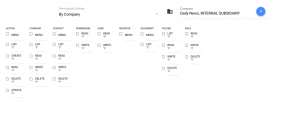
- We check all actions except for permissions as we don’t want Daily News having the rights to edit permissions and users.
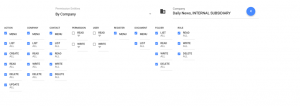
- When we check all the actions, ranges default to ALL. That’s ok for us as we want Daily News contacts to have have access to all the records.
- All actions changes will update the Our Management Platform in realtime.
- That’s it, Daily New contacts permissions are set
[/fusion_text][/fusion_builder_column][/fusion_builder_row][/fusion_builder_container]