
Module permissions allows us to restrict access to modules and their respective sub-actions through Module Permissions. Topic areas covered:
- Access Module Permissions
- Module Permissions Page
- Explanation of Module Permissions
- Working Example
Access Module Permissions
To access the Module Permissions:
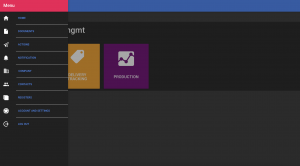
- Side Menu Panel

- Accounts and Settings
3. Permissions Button
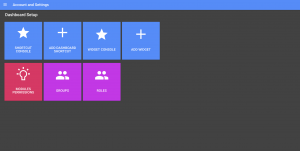
Module Permissions Page
To see the permissions set for an entity click on the permission hierarchy drop-down menu and select an entity from the menu.
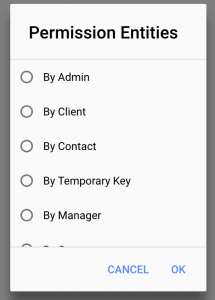
Hit OK and a set of the module permissions will be showed for that entity. Below is snapshot of the permissions set for Admin entity.
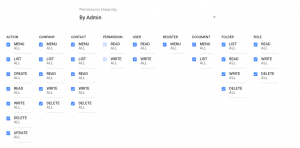
Explanation of Module Permissions
How are Permissions Inherited
Permissions are assigned through contacts a user is assigned too. All contacts start with no permission. Through permission entities we assign permissions. Once we apply a set of permissions through an entity it can’t be removed through an another permission entity.
Entities
An entity is a permission set on a group or individual. If a contact belongs to that entity these permissions will apply to them. Below is a table of the various entities that can be assigned within Modules Permissions and Folder and Document Permissions.
[/fusion_text][fusion_table]
| Permission | Description | Example |
|---|---|---|
| By Admin | Any contact which has been designated as the client’s administrator, any permissions set to ‘By Admin’ these permissions levels will be applicable to contacts who are administrators. | |
| By Client | This applies to all contacts within the client’s system. | Column 2 Value |
| By Contact | Permission set for a contact, these permissions will only apply to the contact assigned to. | Column 2 Value |
| By Temporary Key | We can define permissions set to a temporary key. User who access the system via this temporary key, these permissions would apply. | Column 2 Value |
| By Manager | A permission can be set to managers of a company. Permission set to a company’s manager, the permissions will apply to contacts where they have been assigned as a manager to the company. | Column 2 Value |
| By Group | Contacts can be belong to a group. If a permission is applied to a group, these permissions will apply to all contacts belonging to the group. | Column 2 Value |
| By Organisation Category | Organisation have organisation types. Organisation Types can belong to one category being INTERNAL, SUPPLIER, CUSTOMER, CONTRACTOR/CONSULTANT (or as defined). If a permission is set for this category, these permissions will apply to contacts that belong to the organisations that belong to these categories. | Column 2 Value |
[/fusion_table][fusion_text columns=”” column_min_width=”” column_spacing=”” rule_style=”default” rule_size=”” rule_color=”” class=”” id=””]
Modules and Actions
The different systems within the Platform are called modules. Below is a description of each module. Furthermore to see the applicable actions for each table see link Module Actions
[/fusion_text][fusion_table]
| Module | Description |
|---|---|
| ACTION | Action Management System to delegate and track tasks to any contact within the client’s online management system. |
| ORGANISATION | Organisation database including internal, customers, suppliers etc. Organisations also refers to sites, internal division or as defined by the organisation types of the system. |
| CONTACT | Contacts database where we store all individuals and employees belonging to a company define in the company database. |
| PERMISSION | Module Permissions System. This is default for admin users. |
| DOCUMENT | In relation to the Documents inside the document management system. Note there are additional permissions set on each document. If you would like your users to access document management system we recommend providing full access to DOCUMENT actions and then applying the document permissions via the document management system. |
| FOLDER | The document management system contains folders. These permissions affect the actions in relation to folders. Similar to documents, permissions can be applied on each individual folder through the document management system. If you would like user to have access to the document management system, we recommend providing access to all folders and then apply the custom permission through the document management system. |
| ROLE | Contacts can be assigned roles. These permissions affects the actions in relation to roles. |
[/fusion_table][fusion_text columns=”” column_min_width=”” column_spacing=”” rule_style=”default” rule_size=”” rule_color=”” class=”” id=””]
Assign Module Action
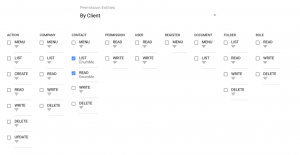
In the permission system if an entity has access has been given access to an action a tick is appeared next to the action under the module.
For example the permission set for client below, access is given to CONTACT LIST and CONTACT READ only.
Range
The range of records an action can be performed on is the Action Range. By default when we tick the checkbox for an action, the contact can preform that action on ALL records for within the module. However we can filter the records for each action using ranges. Ranges can be changed by clicking below the ACTION:

This brings up the menu which shows the action range. You can pick more than one range.
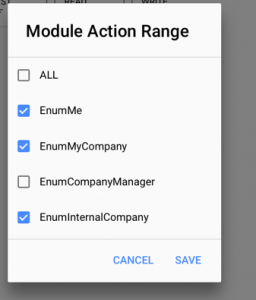
The different types of ranges for each component is described below:
[/fusion_text][fusion_table]
| Module | Range | Description |
|---|---|---|
| ACTION | ALL | For all action records. |
| EnumMyCompany | For actions records that belong to the contact’s company. | |
| EnumCompanyManager | For action records where the contact is the manager of the company the action record belongs. | |
| EnumSubscriber | For action records where the contact has been subscribed to the action. | |
| EnumInternalCompany | For action records where the contact belongs to the same company category INTERNAL the action belongs to. | |
| EnumCustomerCompany | For action records where the contact belongs to the same company category CUSTOMER the action belongs to. | |
| EnumSupplierCompany | For action records where the contact belongs to the same company category SUPPLIER the action belongs to. | |
| EnumContractorConsultant | For action records where the contact belongs to the same company category CONTRACTOR/CONSULTANT the action belongs to. | |
| COMPANY | ALL | For all company records |
| EnumMyCompany | Where the user’s contact profile belongs to the company. | |
| EnumCompanyManager | Where the user’s contact profile is the manager of the company. | |
| EnumSubscriber | Where company records belong to category INTERNAL. | |
| EnumInternalCompany | Where company records belong to category CUSTOMER. | |
| EnumCustomerCompany | ||
| EnumSupplierCompany | Where company records belong to category SUPPLIER. | |
| EnumContractorConsultant | Where company records belong to category CONTRACTOR/CONSULTANT | |
| EnumMe | The user’s company | |
| CONTACT | ALL | For all contact records |
| EnumMyCompany | Contacts records that belong to the user contact’s company. | |
| EnumCompanyManager | Contacts records that belong to the where the user contact is the manager of the company. | |
| EnumInternalCompany | Contact records that belong company category INTERNAL | |
| EnumCustomerCompany | Contact records that belong company category CUSTOMER | |
| EnumSupplierCompany | Contact records that belong company category SUPPLIER | |
| EnumContractorConsultant | Contact records that belong company category CONTRACTOR/CONSULTANT | |
| EnumMe | The user contact’s record | |
| PERMISSION | ALL | For all permission records |
| EnumMyCompany | Permission records that belong to the user contact’s company. | |
| EnumCompanyManager | Permission records that belong to the where the user contact is the manager of the company. | |
| EnumInternalCompany | Permission records that belong company category INTERNAL | |
| EnumCustomerCompany | Permission records that belong company category CUSTOMER | |
| EnumSupplierCompany | Permission records that belong company category SUPPLIER | |
| EnumContractorConsultant | Permission records that belong company category CONTRACTOR/CONSULTANT | |
| USER | ALL | For all users |
| REGISTER | N/A | |
| DOCUMENT | ALL | For all document records |
| EnumMyCompany | For document records that belong to the contact’s company. | |
| EnumCompanyManager | For document records where the contact is the manager of the company the document record belongs to | |
| EnumSubscriber | For document records where the contact has been subscribed to the document | |
| EnumInternalCompany | For document records where the contact belongs to the same company category INTERNAL the document belongs to | |
| EnumCustomerCompany | For document records where the contact belongs to the same company category CUSTOMER the document belongs to | |
| EnumSupplierCompany | For document records where the contact belongs to the same company category SUPPLIER the document belongs to | |
| EnumContractorConsultant | For document records where the contact belongs to the same company category CONTRACTOR/CONSULTANT the document belongs to | |
| EnumOwner | For documents records where the contact is the owner of the document | |
| FOLDER | ALL | All Folders |
| ROLE | ALL | All Roles |
[/fusion_table][fusion_text columns=”” column_min_width=”” column_spacing=”” rule_style=”default” rule_size=”” rule_color=”” class=”” id=””]
Next
In the next section we go over a Permission Module Example
[/fusion_text][/fusion_builder_column][/fusion_builder_row][/fusion_builder_container][fusion_builder_container hundred_percent=”no” hundred_percent_height=”no” hundred_percent_height_scroll=”no” hundred_percent_height_center_content=”yes” equal_height_columns=”no” menu_anchor=”” hide_on_mobile=”small-visibility,medium-visibility,large-visibility” class=”” id=”” background_color=”” background_image=”” background_position=”center center” background_repeat=”no-repeat” fade=”no” background_parallax=”none” enable_mobile=”no” parallax_speed=”0.3″ video_mp4=”” video_webm=”” video_ogv=”” video_url=”” video_aspect_ratio=”16:9″ video_loop=”yes” video_mute=”yes” video_preview_image=”” border_size=”” border_color=”” border_style=”solid” margin_top=”” margin_bottom=”” padding_top=”” padding_right=”” padding_bottom=”” padding_left=””][fusion_builder_row][fusion_builder_column type=”1_1″ layout=”1_1″ spacing=”” center_content=”no” link=”” target=”_self” min_height=”” hide_on_mobile=”small-visibility,medium-visibility,large-visibility” class=”” id=”” background_color=”” background_image=”” background_position=”left top” background_repeat=”no-repeat” hover_type=”none” border_size=”0″ border_color=”” border_style=”solid” border_position=”all” padding_top=”” padding_right=”” padding_bottom=”” padding_left=”” dimension_margin=”” animation_type=”” animation_direction=”left” animation_speed=”0.3″ animation_offset=”” last=”no”][/fusion_builder_column][/fusion_builder_row][/fusion_builder_container]