
[fusion_builder_container hundred_percent=”no” hundred_percent_height=”no” hundred_percent_height_scroll=”no” hundred_percent_height_center_content=”yes” equal_height_columns=”no” menu_anchor=”” hide_on_mobile=”small-visibility,medium-visibility,large-visibility” class=”” id=”” background_color=”” background_image=”” background_position=”center center” background_repeat=”no-repeat” fade=”no” background_parallax=”none” enable_mobile=”no” parallax_speed=”0.3″ video_mp4=”” video_webm=”” video_ogv=”” video_url=”” video_aspect_ratio=”16:9″ video_loop=”yes” video_mute=”yes” video_preview_image=”” border_size=”” border_color=”” border_style=”solid” margin_top=”” margin_bottom=”” padding_top=”” padding_right=”” padding_bottom=”” padding_left=””][fusion_builder_row][fusion_builder_column type=”1_1″ layout=”1_1″ spacing=”” center_content=”no” link=”” target=”_self” min_height=”” hide_on_mobile=”small-visibility,medium-visibility,large-visibility” class=”” id=”” background_color=”” background_image=”” background_position=”left top” background_repeat=”no-repeat” hover_type=”none” border_size=”0″ border_color=”” border_style=”solid” border_position=”all” padding_top=”” padding_right=”” padding_bottom=”” padding_left=”” dimension_margin=”” animation_type=”” animation_direction=”left” animation_speed=”0.3″ animation_offset=”” last=”no”][fusion_text columns=”” column_min_width=”” column_spacing=”” rule_style=”default” rule_size=”” rule_color=”” class=”” id=””]
Folder and Document Permissions
Our Management Platform has a dedicated document management system to manage all your uploaded files as well documents created within the platform such as electronic forms and electronic registers. Similar to your pc environments documents can be organised in folders with addition of version control and granular permission control.
Granular Permissions
We have created a granular permissions system control access any document stored under the Document Management System. Through the document permissions you have complete control who sees which folders and documents, what can actions can be done ie read, edit, delete.
Document Permissions Vs Module Permissions
In module permissions we can turn on/off access to each module actions. We can also control high level what records are shown for each permission entity (see xxx for more information) by setting the range. Document and Folder permissions provides another level of control on the documents and folders. The document and folder permissions allows the user to set permissions on a specific folder or document. This gives us granular control over the folders and permissions allowing us for example creating a customer folder where only a specific customer can access it or a confidential employee document where only the manager and corresponding employee can access it. The combinations are limitless where ultimately you can set it up to how you run your organisation.
Enable Document and Folder Permission Module
To access permission in through the Document Management System you must have Document and Folder Permission Module enabled. Please follow the steps defined in Module Permissions
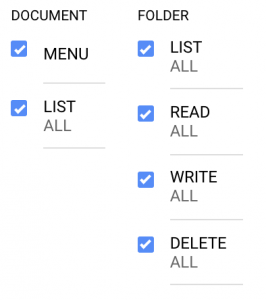 =
Note: Unless you are advance user we recommend to enable ALL for range for Document and Folder Permission as the general setup.
Folder and Document Permission Mode
Folder and Document Permission mode will
To access folder and document permissions please follow these steps:
- Home
- -> Side Menu Panel
- -> Documents(SIDE-MENU)
- Click on your client name(top item) in shortcut panel to show root directory*
- You should be able to your root directory and default folders
- Click on XX button
- Click on permission Mode
If done correctly a lock should appear as below and the shortcut panel should be showing permission mode (when in desktop mode).
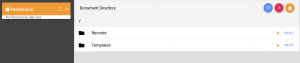
Select Folder or Document Permission
Once in Folder and Document Permission mode you can see the permission set on a document or folder by clicking on the lock button that appears to the corresponding folder or document name.
Folder Permission
Document Permission
Folder and Document Permissions Hiearchy
Permissions are assigned through contacts a user is assigned too. All contacts start with no permission. Through permission entities we assign permissions. Once we apply a set of permissions through an entity it can’t be removed through an another permission entity.
In Our Management Platform the folder permissions are separate from Document Permissions. This means if you set permissions for the folder this may not nessarily apply to the documents within that folder. We can set default document permissions where if we create a document within a folder it inherit those document permissions. However an authorised contact can still change the permissions in that document specifc to that document. We did so that users can share specifc documents through a link or document id without having access to all the files within that folder.
EXAMPLE HERE
Folder and Document Permissions Entities
We apply a set of permissions through an entity. The permissions applied to that entity will affect any contact who belongs to that entity. A definition of the all the entities is provided throught the following link:
Set Folder Permission
Default Document Permission
Folder and Document Search Behaviour
- What they do and don’t see
Document Permission
Working Example
- Company Folder – To Keep policies, notices etc
- Manager Folder
- Employee Personal Folder
- Customer Folder
TROUBLE SHOOT
if you can’t see Documents in side-menu pleas check if DOCUMENT-MENU is enabled in your permisions.
Don’t see any documents, you may not h
Access Document Permission in Document TBC
[/fusion_text][/fusion_builder_column][/fusion_builder_row][/fusion_builder_container]